
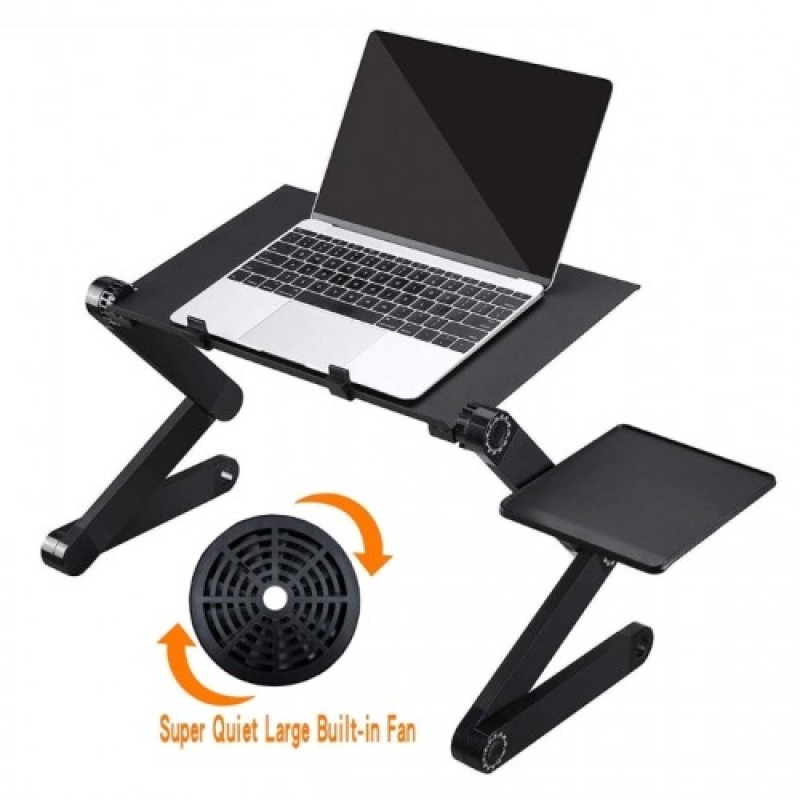
Laptop Table Stand with Adjustable Folding Ergonomic Design - No DC
- Product Code: LTS07
- EAN: 202006130056
- Availability: 100
Adjustable Folding Ergonomic Laptop Table Stand – No DC
Upgrade your work-from-home comfort, study setup, or leisure browsing with the Laptop Table Stand with Adjustable Folding Ergonomic Design (No DC). Built with fully articulated 360-degree locking joints and an ergonomic tray, this versatile portable desk allows you to customize the height and angle of your laptop to match your exact posture—whether sitting at a desk, reclining on a sofa, or relaxing in bed.
Operating 100% mechanically (No DC power supply, electrical cables, or battery charging required), it raises your laptop screen to natural eye level to relieve neck, back, and wrist strain. Engineered with high-strength lightweight aluminum alloy and featuring ventilated surface cut-outs for passive heat dissipation, it folds completely flat in seconds for effortless storage and transport.
Key Features & Specifications
-
Product Type: Portable Folding Ergonomic Laptop Stand / Bed Lap Tray.
-
Ergonomic Multi-Angle Adjustability:
-
Equipped with 360-degree rotating auto-locking joints on each leg segment.
-
Adjusts smoothly to multiple configurations: sit-to-stand desk converter, bed lap desk, sofa reading stand, or floor workstation.
-
Clear angle-degree markers printed on joint dials allow quick, symmetrical angle matching on both sides.
-
-
Zero Electrical Power Required (No DC):
-
100% mechanical adjustment mechanism with heavy-duty push-button click-lock hinges.
-
Requires zero DC power adapters, batteries, motors, or USB power cables.
-
-
Passive Cooling & Ventilation:
-
Tray surface features hollow ventilation vents / slotted cut-outs to maximize natural airflow and keep laptops running cool.
-
Thermal-conductive aluminum tray acts as a natural heat sink, preventing CPU thermal throttling.
-
-
Universal Laptop Compatibility:
-
Sturdy tray accommodates laptops, MacBooks, and notebooks from 11 inches up to 17 inches.
-
Raised front edge lip and non-slip stoppers prevent laptops, tablets, or books from sliding off when tilted at steep angles.
-
-
Detachable Side Mouse Pad / Accessory Platform:
-
Includes a mountable mouse platform that bolts easily to either side of the leg frame, catering to both right-handed and left-handed users.
-
Doubles as a steady rest for smartphones, coffee mugs, or notepads.
-
-
Lightweight & Ultra-Portable Aluminum Build:
-
Manufactured from premium frosted aluminum alloy and durable ABS joint components.
-
Collapses completely flat down to a slim profile, sliding easily under beds, behind couches, or into carry bags and luggage.
-
Broad Universal Applications & Target Uses
-
Work From Bed & Sofa Lounging: Provides a stable, elevated desk surface over your legs while lounging on couches, armchairs, or in bed without heating your lap.
-
Sit-Stand Desk Converter: Place atop any standard dining table or office desk to instantly create an affordable standing desk workstation.
-
Neck & Spine Posture Correction: Elevates laptop screens to ergonomic eye level, preventing slouching, tension headaches, and chronic neck fatigue during long study sessions.
-
Tablet, Book & Sheet Music Holder: Works as an adjustable angle easel for textbooks, recipes in the kitchen, sheet music, or digital drawing tablets.
-
Outdoor & Travel Work: Lightweight, fold-flat design makes it convenient for use in campers, outdoor decks, hotel rooms, or dorm living.
Quick 4-Step Setup & Operation Guide
-
Adjust Leg Angles: Press and hold the push-button hinge dial on each joint, swing the leg segment to your preferred angle (check angle degree markings), and release to lock firmly in place.
-
Attach Mouse Tray (Optional): Fasten the detachable mouse pad bracket onto the side leg tube using the included thumbscrew.
-
Place Laptop & Adjust Tilt: Set your laptop on the ventilated tray, ensuring the bottom edge rests securely against the front anti-slip stoppers.
-
Fold Flat for Storage: When finished, press the joint buttons to align all leg segments parallel with the main panel, folding the stand flat for compact storage.