
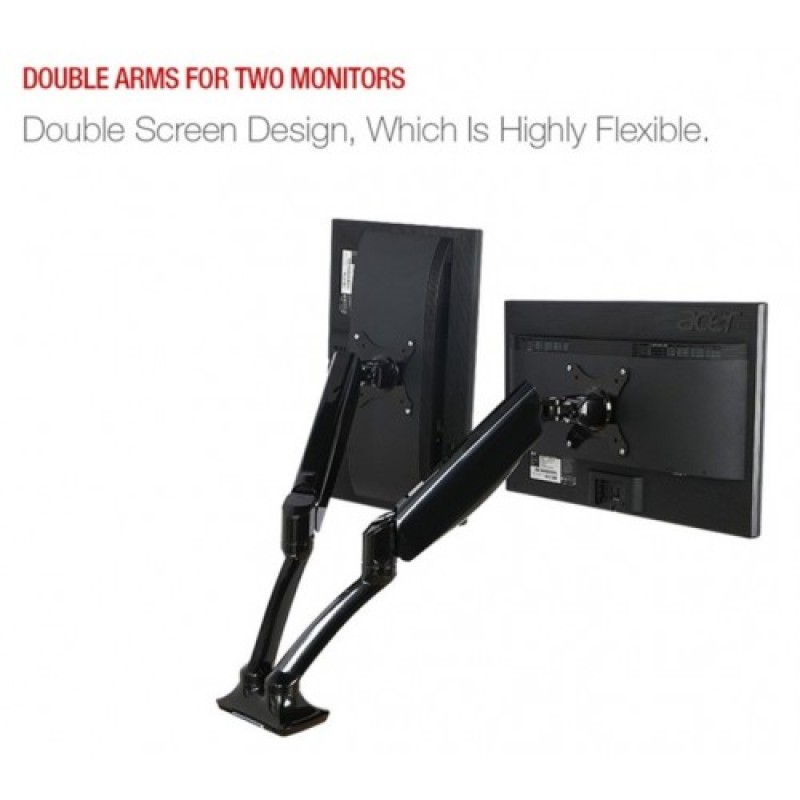
Desktop Gas Spring 17-27" Monitor Holder Mount Arm Full Motion Dual Display Stand Loading 2-9 kgs - No DC
- Product Code: MHS02
- EAN: 202006130053
- Availability: 100
Desktop Gas Spring 17–27" Dual Monitor Mount Arm (Full Motion, 2–9 kg Capacity) – No DC
Reclaim valuable workspace and create an ergonomic multi-display workstation with the Desktop Gas Spring 17–27" Dual Monitor Mount Arm (Full Motion, 2–9 kg Capacity – No DC). Engineered with precision counterbalance gas spring pneumatic cylinders, this heavy-duty dual-arm bracket allows effortless, fingertip adjustment of two computer screens independently for height, tilt, swivel, and 360-degree rotation.
Operating 100% mechanically (No DC power adapter, electrical cords, or motorized components required), it supports two displays ranging from 17 inches up to 27 inches, with a sturdy weight capacity of 2 kg to 9 kg per arm. Designed for quick, non-destructive installation via a heavy-duty C-clamp or grommet base, it frees up valuable desk space while promoting proper spinal posture throughout long working or gaming sessions.
Key Features & Specifications
-
Product Type: Dual-Screen Gas Spring Ergonomic Monitor Desk Mount Arm.
-
Screen Size & Weight Compatibility:
-
Supported Monitor Sizes: Fits most 17" to 27" flat and curved computer monitors.
-
Weight Capacity: Supports 2 kg to 9 kg (4.4 lbs to 19.8 lbs) per arm, accommodating lightweight office monitors and heavier gaming panels.
-
-
VESA Standard Compliance:
-
Compatible with standard 75 × 75 mm and 100 × 100 mm VESA mounting hole patterns.
-
Detachable VESA plate interface for fast, safe monitor attachment.
-
-
Full-Motion Articulation & Ergonomics:
-
Counterbalance Gas Spring Height Adjustment: Smooth, tool-free vertical travel to align screens precisely at natural eye level.
-
Tilt Range: Up to +85° / -30° vertical tilt to reduce screen glare and accommodate sitting or standing desk heights.
-
Swivel Range: 180° horizontal arm swivel for effortless screen sharing with colleagues.
-
360° Rotation: Rotate screens between landscape and portrait orientation for coding, reading long documents, or spreadsheets.
-
-
Zero Electrical Power Required (No DC):
-
Fully mechanical gas strut and steel hinge operation.
-
Zero reliance on DC power bricks, charging cables, wall plugs, or motor mechanisms.
-
-
Integrated Cable Management:
-
Built-in routing channels and snap-fit cable covers along each arm route HDMI, DisplayPort, and power cables neatly down to the desk base, eliminating tangled cable clutter.
-
-
Dual Desk Mounting Options Included:
-
C-Clamp Mount: Sturdy side-clamp installs onto standard desk edges without drilling holes.
-
Grommet / Hole Mount: Bolts securely through pre-drilled cable grommet openings on office workstations.
-
-
Heavy-Duty Construction:
-
Crafted from high-grade aircraft aluminum alloy, heavy-gauge cold-rolled steel, and reinforced engineering plastics for lasting stability without screen wobbling.
-
Broad Universal Applications & Target Uses
-
Home & Corporate Office Workstations: Position spreadsheets on one screen and video calls or emails on the other to boost daily productivity.
-
Software Development & Coding: Rotate one monitor into vertical portrait mode for viewing long lines of code while keeping documentation open on the primary landscape display.
-
Dual-Screen PC Gaming: Create a panoramic dual-monitor cockpit setup with fine-tuned bezel alignment for immersive flight, racing, or streaming setups.
-
Financial Trading & Analytics: Keep live trading charts, data tickers, and market news in continuous, comfortable view.
-
Ergonomic Sit-Stand Desks: Raise or tilt monitors instantly to maintain correct viewing angles when transitioning between sitting and standing desks.
Quick 4-Step Setup & Operation Guide
-
Mount Base to Desk: Fasten the base bracket securely onto your desk edge using either the heavy-duty C-clamp or through-desk grommet fitting.
-
Attach VESA Plates: Secure the VESA mounting plates to the back of both 17–27" monitors using the provided screws and spacers.
-
Mount Screens to Arms: Slide each monitor onto the articulated gas spring arm bracket until it locks firmly in place.
-
Calibrate Gas Spring Tension: Use the included Allen key to adjust the gas cylinder tension screw (+ for heavier screens, - for lighter screens) until both monitors float effortlessly at your desired height.
- Bearing: 2-9 KG or 4.4-19.8lbs per arm
- VESA: 75*75mm; 100*100mm;
- Applicable LCD Size: 10"-27"
- Tilt Angle: -85°~15°
- Clamp or Gromment Table Thickness: 25-120mm or 0.98"~4.72"


