
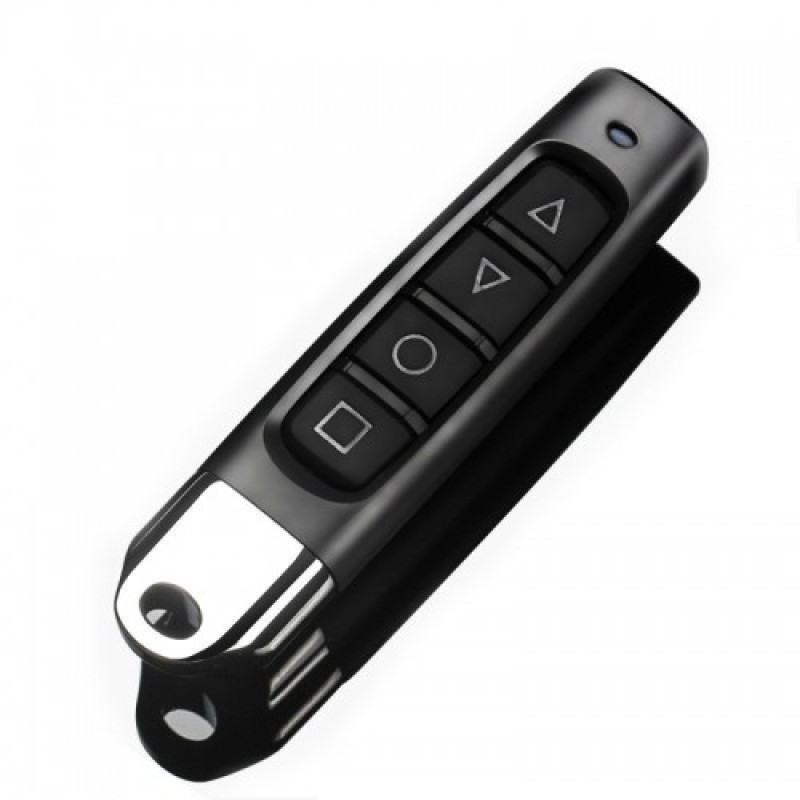
Universal Door Shutter Copy Remote Controller 4 Channel 433MHZ by duplicating cloning Code MRC041
- Product Code: MRC041
- EAN: 202203291006
- Availability: 100
Universal 4-Channel 433MHz Duplicating & Cloning Remote Controller (Model: MRC041)
Easily back up, replace, or consolidate your existing remote controls with the Universal 4-Channel 433MHz Cloning & Duplicating Remote Controller (Model: MRC041). Designed with high-precision RF learning circuitry and four independently programmable channels, this compact key fob copies fixed-code and learning-code wireless remotes directly without requiring access to the main receiver motor control board.
Operating on the standard 433.92MHz frequency, it duplicates signals face-to-face in seconds—making it an ideal, cost-effective replacement or spare for roller shutters, motorized garage doors, driveway security gates, retractable blinds, and wireless RF lighting switches.
Key Features & Specifications
-
Product Type: 4-Channel Face-to-Face RF Duplicating & Cloning Remote Fob.
-
Model: MRC041 Series.
-
Operating Frequency: Standard 433MHz / 433.92MHz (high-stability SAW resonator filter).
-
4-Channel Multi-Device Programming:
-
4 clearly labeled independent buttons (A, B, C, D or 1, 2, 3, 4 / Lock, Unlock, Stop, Mute).
-
Each button functions as an independent channel capable of learning a distinct command—allowing you to clone up to 4 different remotes into a single pocket controller (e.g., Button A for garage, Button B for gate, Button C for shutter).
-
-
Broad Fixed & Learning Code Compatibility:
-
Duplicates the vast majority of standard Fixed-Code and Learning-Code chipsets, including:
-
PT2262, PT2264, PT2260, PT2240, PT2242
-
SC2262, SC2260
-
EV1527, FP527, RT1527
-
HT600, HT680, HT6010, HT6012, HT6014
-
AX5326-3, AX5326-4, SMC918, SMC926, and equivalent standard 433MHz fixed/learning ICs.
-
-
(Note: Not compatible with encrypted proprietary dynamic rolling code systems such as HCS301 or brand-locked rolling protocols).
-
-
Face-to-Face Direct Duplication:
-
Clones existing working remotes by holding them back-to-back or side-by-side.
-
Zero need to open gate motor housings, access internal dip-switches, or press receiver learn buttons.
-
-
Durable Pocket-Friendly Enclosure:
-
Sturdy metal zinc-alloy frame with impact-resistant ABS casing.
-
Features a sliding protective button shield to prevent accidental key presses while carried in pockets or bags.
-
Includes a heavy-duty metal split key ring and clip for attachment to vehicle keys.
-
-
Long-Life Battery Included:
-
Powered by a pre-installed 12V 27A (or 23A) alkaline battery.
-
Low quiescent standby current ensures up to 12–18 months of everyday household use.
-
Broad Universal Applications & Target Uses
-
Roller Shutters & Security Grilles: Clone remotes for commercial shopfront shutters, storage shed roller doors, and warehouse loading bay screens.
-
Garage Doors & Automatic Driveway Gates: Create extra spare keys for family members, tenants, or delivery drivers without paying expensive original equipment manufacturer (OEM) replacement fees.
-
Retractable Awnings & Sunscreens: Duplicate patio canopy and motorized window blind controls.
-
Wireless RF Home Automation: Clone 433MHz remote controls for smart sockets, yard security lights, wireless alarm sirens, and water pump switches.
-
Consolidation & Backup: Replace cracked, faded, or damaged legacy fobs and merge multiple remote units into one sleek keychain.
Quick 4-Step Programming & Cloning Guide
-
Clear Existing Code (Reset):
-
Press and hold both Button A (Lock) and Button B (Unlock) simultaneously until the LED indicator flashes rapidly (approx. 2–3 seconds).
-
Release both buttons. Press any button to verify: if the LED does not stay lit and flashes once briefly, the memory is cleared and ready for programming.
-
-
Face-to-Face Duplication:
-
Place the original working remote and the MRC041 cloner as close as possible (back-to-back or touching side-by-side).
-
Press and hold the target button on your original remote, then immediately press and hold the corresponding button on the MRC041 you wish to program.
-
-
Confirm Learning:
-
Keep both buttons depressed until the LED indicator on the MRC041 transitions from slow blinks to rapid continuous flashing or steady illumination, indicating successful code duplication.
-
Release both buttons.
-
-
Repeat for Remaining Channels:
-
Repeat steps 2 and 3 for Buttons B, C, and D with other channels or remotes as needed.
-
(Recovery Tip: If you accidentally clear the codes, press and hold Buttons C and D simultaneously until the LED flashes rapidly to restore the previous programmed memory).
-